Github写作注意事项
| 2016.5.8 - 南京 | github |
假设已经搭建好了Github Pages,那么可以开始动手DIY自己的文章了
使用一个简单的模板开始
建议从jekyll的Github Repositoriesclone一个副本到本地自己修改,一般都是从简单的开始嘛。clone第一个模板Tom Preston-Werner到本地修改,遇到了几点要注意的:
- _config.yml文件的配置,它默认是markdown:rdiscount,这个是没有代码高亮的,那我们就要找一个高亮的,从jekyll的Github Repositories点开慢慢找,看哪里有代码高亮的,然后点它的source找到它的_config.yml文件,参考它是怎么配置的,我找到了一个markdown:redcarpet,这个是代码块有高亮标识关键字的,还有一个选项pygments:true,这个选项是做什么用的呢,就是高亮的,可以上pygments的官网了解一下
-
如果放一张图片宽度超过屏幕的显示,会出现水平滚动条,怎么解决呢,some googling later,可以使用html标签
<img src="/images/MethodDraw.png" width="100%">显示图片,修改之后预览,又发现一个问题,就是每张图片的宽度都是100%了,没有到达100%的和超过100%的都会拉伸或压缩成100%,这就是问题了,some googling later again,用样式来控制
  img {
    max-width: 100%;
    height: auto;
    width: auto;
  }
这样就自动处理图片的宽度问题,太大会压缩,太小会保持原尺寸
-
怎么让超链接自动识别呢,比如https://github.com它不能点击呢,那就要加字符包围了,放在<>中间就可以了https://github.com,或者_config.yml配置一下
  redcarpet:
    extensions: ["no_intra_emphasis", "fenced_code_blocks", "autolink", "tables", "with_toc_data"]
这样之后就autolink了,不用加<>就能自动识别你的超链接了
-
怎么让代码显示行号呢,参考这里
var fs = require('fs'); // Load client secrets from a local file. fs.readFile('client_secret.json', function processClientSecrets(err, content) { if (err) { console.log('Error loading client secret file: ' + err); return; } // Authorize a client with the loaded credentials, then call the // Google Calendar API. authorize(JSON.parse(content), listEvents); }); - 怎么格式化成中文日期呢,参考这里
- 怎么统计文章数量呢,参考这里
- 编写表格的markdown在本地和github预览显示都没问题,但是在github pages上预览就没效果,参考这里
- 有什么好的写作模板推荐呢,vrepin,sources和zegoggl,sources,其中vrepin支持手机模式和readmore,zegoggl关键在于简洁,只有博客标题和文章列表,年月日分类
- 还有一个drewsilcock,sources,预览就就知道了,支持手机,有标签分类
- github的写作语法可以参考这里
- jekyll语法参考这里
更新列表:
-
2016-5-13
-
_config.yml默认配置
# Where things are source: . destination: ./_site plugins: ./_plugins layouts: ./_layouts data_source: ./_data collections: null # Handling Reading safe: false include: [".htaccess"] exclude: [] keep_files: [".git", ".svn"] encoding: "utf-8" markdown_ext: "markdown,mkdown,mkdn,mkd,md" # Filtering Content show_drafts: null limit_posts: 0 future: true unpublished: false # Plugins whitelist: [] gems: [] # Conversion markdown: kramdown highlighter: rouge lsi: false excerpt_separator: "\n\n" # Serving detach: false port: 4000 host: 127.0.0.1 baseurl: "" \# does not include hostname # Outputting permalink: date paginate_path: /page:num timezone: null quiet: false defaults: [] # Markdown Processors rdiscount: extensions: [] redcarpet: extensions: [] kramdown: auto_ids: true footnote_nr: 1 entity_output: as_char toc_levels: 1..6 smart_quotes: lsquo,rsquo,ldquo,rdquo enable_coderay: false coderay: coderay_wrap: div coderay_line_numbers: inline coderay_line_number_start: 1 coderay_tab_width: 4 coderay_bold_every: 10 coderay_css: style -
2016-5-18
-
使用星号作为li列表项之后,要把子内容缩进,只要在前面加4个空格即可,但是每行都加会非常麻烦,如果能用tab键帮忙加就好了,这是可以的,你配置一下就可以了,在Preferences->Settings - User->添加如下的项
{ "translate_tabs_to_spaces": true, "tab_size": 4 }这样配置之后,按一个tab键就缩进4个空格,选多行的话,每行都缩进4个空格,本来想在代码里加注释的,但是json不支持注释,它只有对象和数组,具体看这里
-
github的排序问题,如果你自己写1,2,3……的话,它渲染会缺少某一项,如会渲染成1,2,2,3这样子,所以你需要这样写
  1. Types
  1. References
  1. Objects
效果会是这样
1. Types 2. References 3. Objects -
github制作目录的方法
  1. [Types](#types)
  1. [References](#References)
然后在下文使用带#号的标题,名为Types,如下面这样
### Types这样就可以点目录进入相应的内容项
还有可以添加back to top,跳转回目录,假如你的目录是这样定义的
## Table of Contents那你在下面就可以用以下代码返回目录
**[⬆ back to top](#table-of-contents)** -
2016-5-21
-
markdown输出html源码
可以使用代码包围起来或者使用
<和> -
在markdown里面输出{{content}}这种格式时,如果不在代码块里面,则可以用
{替换第一个{,其他照旧,如{{content}};如果在代码块里面则需要使用下面的代码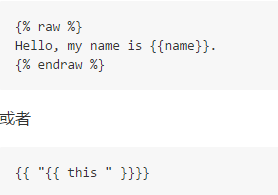
参考文章:
- Getting Started with Jekyll (plus a Free Bootstrap 3 Starter Theme)
- Airbnb JavaScript Style Guide
- How to escape liquid template tags
相关阅读